
When it comes to labelling AI content, news and newsletters keep mentioning one date: 2 December 2026, “the day AI content has to be marked”. If your website uses images from a generator or text that ChatGPT helped to write, it is easy to read this as a new obligation for you.
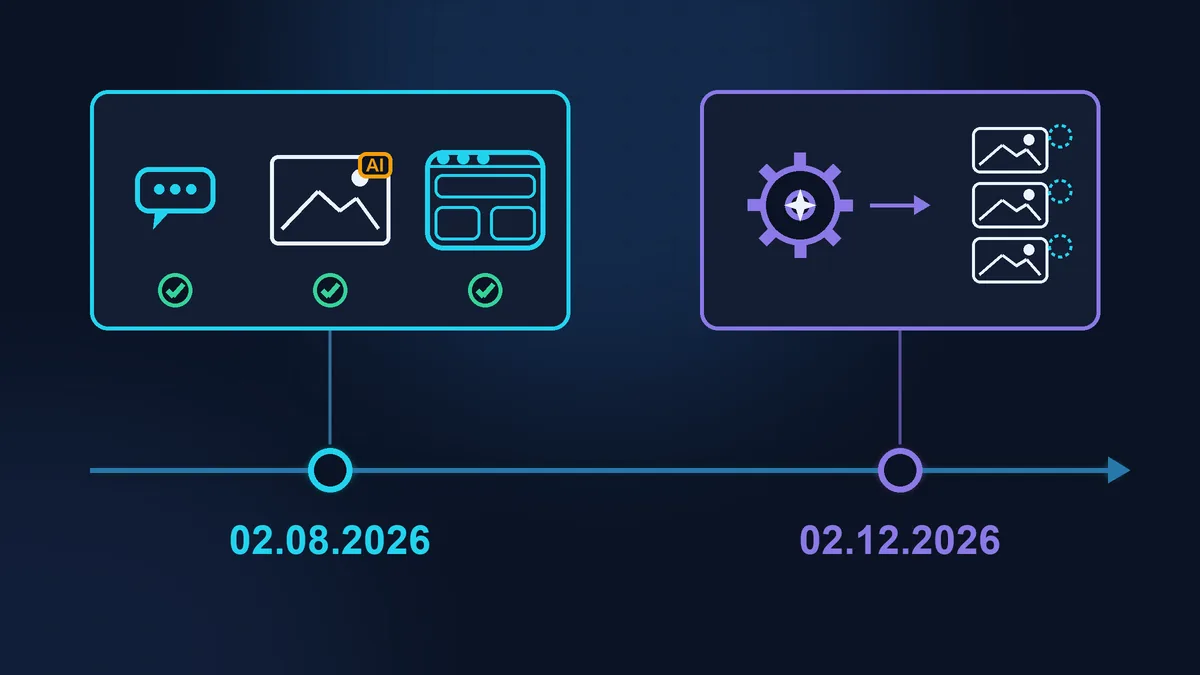
The short answer: the date is real, but it concerns the companies that make AI generators, not the people who use them. What applies to an ordinary website has been in force since 2 August 2026, and 2 December changes nothing for it. Below I explain where the line is drawn and what a website owner can check for themselves.
A caveat first: I am a webmaster, not a lawyer. This article covers the technical side and links to the official texts, with dated sources at the end. For a general overview of the regulation, see The AI Act and your website: what changed on 2 August 2026. I won’t repeat it here.
Labelling AI content: what exactly happens on 2 December 2026
Paragraph 2 of Article 50 of the EU AI Act says that providers of generative AI, meaning the companies that release image, video, audio and text generators, must mark their output in a machine-readable format (machine-readable marking). This is metadata in the file or an invisible watermark that lets software detect that the content was created by AI. A person cannot see it.
In summer 2026 the regulation was amended by the “Digital Omnibus” (Regulation 2026/1744, in force since 27 July 2026). It gave generators a grace period: those already on the market before 2 August 2026 have until 2 December 2026 to comply with this paragraph. New generators released after 2 August must mark their output from day one.
What the grace period does not cover:
- a chatbot’s obligation to tell people they are talking to AI: this has applied since 2 August 2026;
- visible labelling of deepfakes and of certain texts (more on these below): also since 2 August 2026, with no transition period.
2 December 2026 also brings new bans on non-consensual intimate deepfakes and on child sexual abuse material. They have nothing to do with an ordinary website.
Provider or deployer: which are you?
The regulation splits the players into roles, and the obligations depend on the role. The European Commission’s guidelines on Article 50 (published on 20 July 2026) explain them with examples.

Provider
Releases an AI system under its own name: an image generator, a chatbot service. A company also becomes a provider when it builds a chatbot itself, or has one built, and runs it on its own site under its own name. The December date is about generator providers.

Deployer
The regulation’s term (déployeur in the French text) for someone who uses another company’s AI in their work: making images for the website, writing copy, installing a ready-made chat widget. That covers almost every small business. If an employee or freelancer does this on your instructions and under your control, the company is responsible, not them.

Client of an agency
Ordered an ad from an agency and had no say in how or where the agency used AI. According to the Commission’s guidelines, such a client is not a deployer: that role belongs to the agency.
The owner of an ordinary website is almost always a deployer. Their obligations under Article 50 concern what a person sees, not what is hidden in the file.
Images and video: when you need a visible label
The regulation requires a visible label on a deepfake (hypertrucage in the French text of the regulation). This is a realistic image, video or audio that resembles real people, objects, places or events and that someone could take for real. An image is not a deepfake just because it came from a generator.
The Commission’s guidelines give examples that small businesses will recognise:

Probably not a deepfake
- colour correction, removing passers-by, a different background for aesthetic reasons;
- a real product on an AI-generated background, as long as the ad does not mislead about the product itself;
- obvious fantasy: a sphinx above the Eiffel Tower, mice arguing about cheese in a cheese ad.

Deepfake: needs a label
- a product photo where AI has changed the product itself, so that it looks better, more attractive or different from the real thing;
- a video with a realistic AI avatar of the company’s managing director;
- an AI-generated celebrity in an ad.

How to label it. The label must be visible to a person straight away, without clicking or hovering. The generator’s metadata does not count: the guidelines say plainly that the deployer cannot rely on it. For clearly artistic, satirical and fictional works the rules are lighter, and the label can be discreet so as not to spoil the work.
The European Commission has published a free EU icon with the letters “AI” in three types (Basic, “Fully AI-Generated” and “Partially AI-Modified”), in SVG and PNG. Using it is optional, and on its own it does not prove compliance. The Code of Practice on Transparency of AI-generated Content (endorsed by the European Commission) gives examples of where to place such a label: the top right corner of an image, and for text, above it or next to the headline.
Text: a label is rarely needed
AI-generated text only needs a label if it is published to inform the public on matters of public interest: politics, health, safety, the environment, the economy. According to the Commission’s guidelines, advertising copy and product descriptions fall outside this, unless they make health, consumer-safety or environmental claims.
If your topic does fall into this category (for example, a dietitian’s blog about medical conditions), you can skip the label if two conditions are met. First, the text has been properly reviewed by someone who knows the subject, facts included, not just the typos. Second, someone takes editorial responsibility for it, and the website says who, for example in the legal notice (mentions légales, the page French law requires on business websites). If AI rewrote the text again after the check, the check no longer counts. What exactly to check in AI-written text is covered in AI wrote your website copy: what to check before it goes live.
As for older content: images and texts created and published before 2 August 2026 do not need to be labelled retroactively. But text that AI wrote earlier and that is published after that date is judged under the new rules.
Chatbots: who is responsible for what
Under the regulation, the duty to say “you are talking to AI” lies with the chatbot’s provider. If you installed a ready-made widget, the provider is the company that made it. But you are the one who sets the bot’s greeting, name and avatar, and that is exactly what the visitor sees. So check in the widget settings that the greeting mentions AI and that the bot does not have a photo of a person.
The Commission’s guidelines list what is not enough: mentioning AI only in the terms of use, a general line such as “this website uses AI”, a vague label such as “assistant”, or giving the bot a photo of a person. A good approach: the bot says in its first message that it runs on AI, and there is a permanent label next to the input field. Where visitors’ conversations end up is a separate topic: A chatbot on your site: where your customers’ conversations end up.
C2PA metadata: what you can check yourself
Some generators write the marking using the C2PA standard (also known as Content Credentials): signed data inside the file about what created it and when. You can check an image for free at verify.contentauthenticity.org: drag the file into the window and the service will show whether it contains this data.
Compare two files: the original from the generator (the file you downloaded from the service) and the same image saved from your website (right-click on the image, “Save image as”). Often the second one no longer has the marking. When WordPress creates resized copies, it strips metadata by default (this is how the image_strip_meta filter is described in the developer documentation), and it is usually these copies that appear on your pages. Compression plugins and conversion to WebP also often remove the marking, and a screenshot always does.

So what does this mean? A file without a marking does not prove that a human made it. The regulation does not require website owners to keep metadata. Providers that have signed the Code of Practice undertake to ban the deliberate removal of markings in their terms of use. The Code says nothing about automatic compression on a website, but it is still better not to strip markings on purpose: this may breach the terms of the service you use. If you want to keep the markings, check your compression plugin’s settings: some have an option to keep metadata. If you prepare photos for publishing yourself, you may find How to resize photos before publishing them on a website useful.
A 15-minute checklist
- The chatbot’s first message says that AI is answering, and the bot has no photo of a person.
- There are no product photos on the site that AI has made look better than the real product, or such photos carry a visible label.
- Videos with a realistic AI-generated face or voice carry an icon at the start (and during the video if it is long); audio carries a spoken disclaimer.
- Texts on health, safety or the environment have been reviewed in substance by a person, and the site says who is responsible for them.
- You know which generators your freelancer or employee uses for the site’s images.
- For one AI image, you have checked on verify.contentauthenticity.org whether the marking is present in the original and in the copy on your site.
When to call a lawyer and when to call a webmaster
Anyone can read the checklist and fix the bot’s greeting. You need a lawyer if you have videos with an AI avatar of a real person, ads featuring recognisable people, or texts on medicine, finance or politics: the stakes are higher there, and the answer depends on the details. You need a webmaster when the question is technical: where to change the greeting and avatar in the chat widget, how to add an “AI” icon to the corner of images through a template rather than by hand on each one, and why the compression plugin strips metadata.
If you have the time and the inclination, you can do everything on the checklist yourself. If you would rather spend your time on clients than on widget settings, Zen Webmaster will take care of the technical side: you can start with a free audit (just send a link, no logins needed) and then have the fixes done as a one-off job (from €30 excl. VAT, see pricing) or as part of website maintenance.
Sources (checked on 15.10.2026): Regulation (EU) 2024/1689 (AI Act), Article 50; Regulation (EU) 2026/1744 (Digital Omnibus on AI), published on 24.07.2026, new paragraph 4 of Article 111 on the 02.12.2026 deadline (EUR-Lex); Commission guidelines on Article 50, C(2026) 5054, 20.07.2026; Code of Practice on Transparency of AI-generated Content, 10.06.2026; EU icons for labelling AI-generated content; image_strip_meta filter, WordPress.
Rather not deal with it yourself?
Describe the task in a few words. I'll reply within one working day with what needs doing, the price and the timing.
Latest posts