On 26 October I received an enquiry through the contact form on my website. The client wanted monthly WordPress maintenance: updates, daily backups, security. They asked for a fixed monthly price and a start date, and at the bottom they added a link to the “project brief”. The request carried the name of a real person and the website of a real French company. The site loaded, the company existed. What could go wrong? Read on.
It was almost certainly phishing (hameçonnage in French): an attempt to trick someone into opening a link, handing over a password or running a file. I realised straight away that the link was malicious, which is why I never opened it. I dealt with the request the same day, and only examined the link in detail later, when I decided to share the story. Below I explain why this contact form phishing attempt looked genuine, what gave it away and how to check a request like this in a minute without opening anything.
No time to deal with this?
As part of maintenance, I keep an eye on your form, updates and site security, from €79 excl. VAT a month. If you’d rather do it yourself, everything is explained step by step below.
What arrived
The structure of the request, without personal data (I am not publishing the name, the company, the addresses or the link: they were most likely stolen, and the link may be dangerous):
- Name: the real name of a real person;
- Website: the real website of a French company;
- Phone: a French mobile number starting with 06;
- Email: an address on an unfamiliar foreign domain that does not match the company’s website;
- Message: a rewording of my own service and a question about the price;
- Descriptif (description): a link to what looked like a file-sharing service, with my business name in the link address, as if the brief had been prepared for me.
The request passed reCAPTCHA and went through like any other. Only my email client flagged it as spam.
Why the request looked real and what gave it away
The email came from my own website. A person filled in the form, but my server sent the email from my address, so all the email checks passed (SPF and DKIM: signatures that confirm the message was sent by the domain’s real server; more in the article on SPF, DKIM and DMARC). The email really was mine. The filters had nothing to judge but the text. Microsoft described this scheme back in 2021: messages sent through companies’ own forms look like an ordinary customer enquiry, so they are more likely to land in the inbox.
The captcha did not help either, and that is normal. reCAPTCHA assesses whether the behaviour looks like a bot. A person who fills in the form themselves gets through. Protection against bots does not protect against people.

Email not from the company
The company’s website is on one domain, the email on a completely different, unfamiliar one. A real employee writes from a work address, or at least explains why not.

Brief only via a link
The whole substance of the job is hidden behind a link, and the text merely rewords your own service.

Your name in the address
The link was made just for you. That does nothing for the job, but it tells the sender that you opened it.
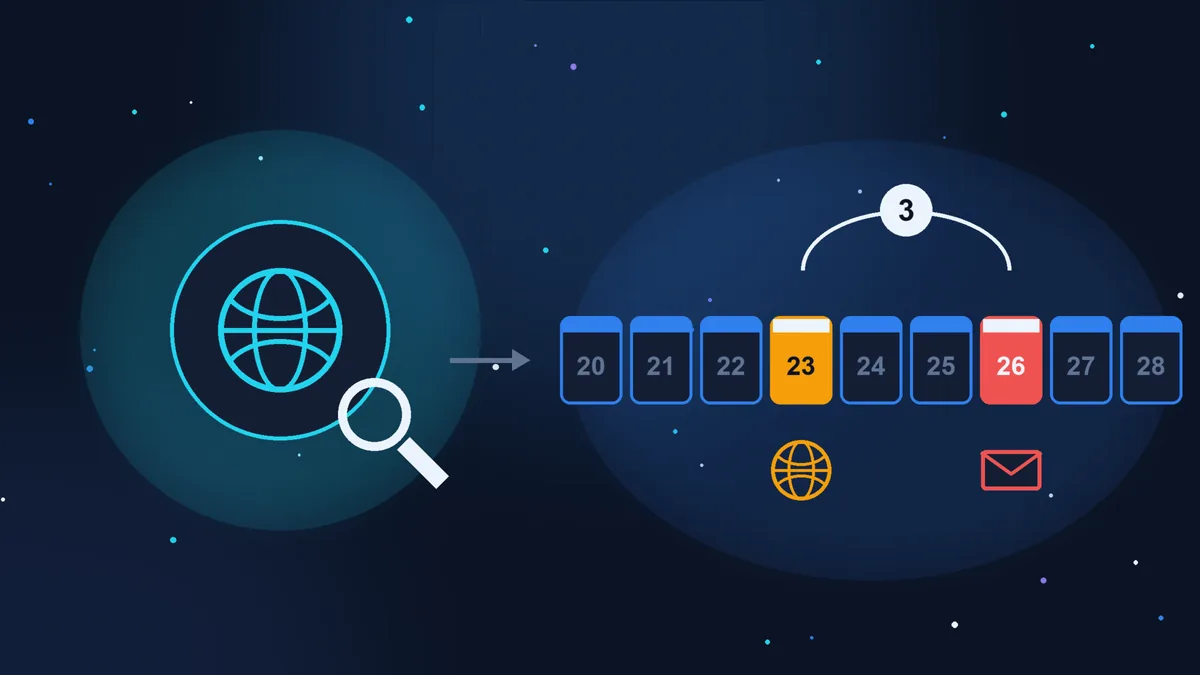
Then I checked the domains without opening anything (how to do that is explained below). The link’s domain was registered on 23 October, three days before the request, and the email domain was suspended by its registry on 27 October.
What this attack is called and what is usually behind the link
The general term is social engineering: deceiving a person rather than hacking software. Add to that impersonation: someone else’s name and company, so that the request passes your own checks. In English the scheme is known as contact form phishing or a fake RFQ (request for quotation). According to Fortra data reported by Help Net Security on 16 October 2026, malicious emails containing the word RFQ grew twelvefold between October 2025 and September 2026.
What is usually behind such a link:
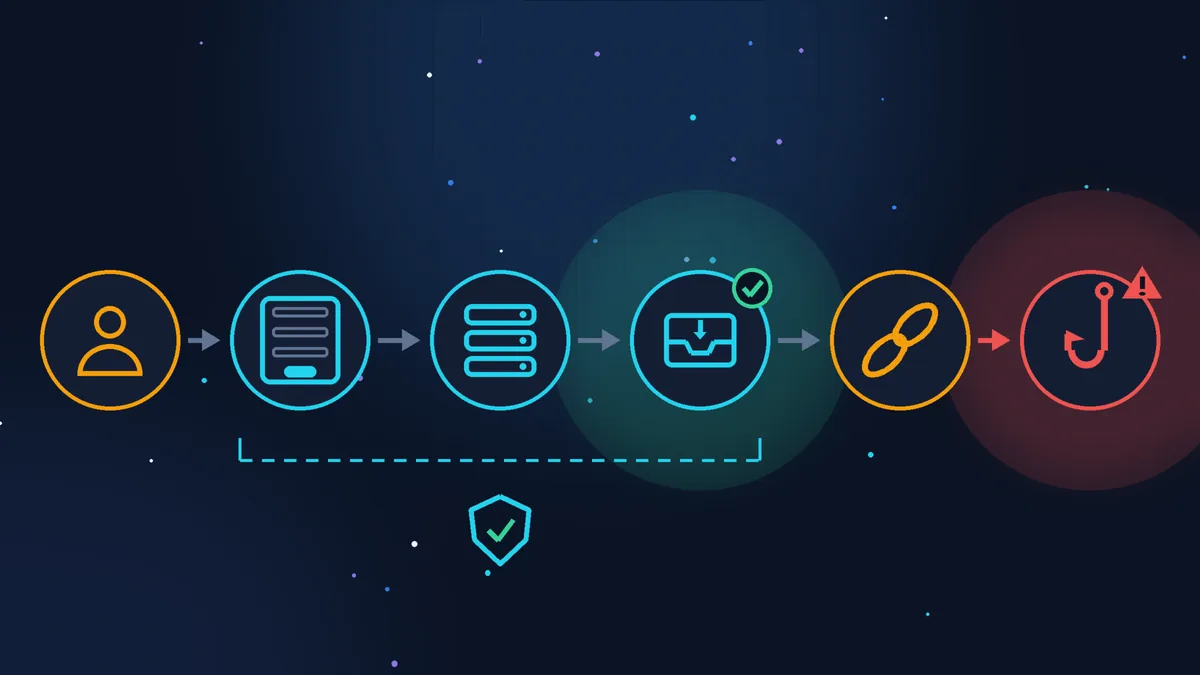
- A fake login page. A “document portal” asks you to sign in with Microsoft or Google, and the password goes to the attacker. According to the same Fortra data, this happened in almost 73% of cases. Once inside the mailbox, attackers look for invoices and bank details and write to your clients in your name.
- A malicious file. An archive “with the brief” that has a program inside. This is how the IcedID (2021) and ZipLine (Check Point, 2025) campaigns worked.
- A long exchange. In ZipLine, the attackers corresponded for about two weeks as if they were partners and even asked for a non-disclosure agreement (NDA) to be signed before sending the file.
How to check a suspicious request in a minute
- Don’t open links or files from the request, not even “just to have a look”.
- Check the company through its official contact details, not the ones in the request. Find its website yourself with a search engine and call the number listed there: “Did someone from your company write to us on 26 October?”. The phone number and email in the request prove nothing.
- Check the age of the domain in the link and the email address. For .com, .net, .online and other generic extensions: ICANN Lookup, the line with the creation date. For .fr: Whois on the Afnic website (Afnic is the registry for .fr). For other countries, start with ICANN Lookup too; if it gives no answer, search for “whois” plus the domain extension. This is a query to the registry, and the site itself is not opened. A registration only a few days or weeks old is a strong warning sign.
- Ask for the brief as text in the body of the email. A real client will have no trouble with that. A scammer usually disappears or insists on the link.
“What if I open it in incognito mode?” Incognito only stops the browser from saving your history and using your existing sign-ins. It does not protect you from a malicious file or a browser vulnerability, and a personalised link will still tell the sender that you opened it. If you really want to see what is behind it, let a service open it for you:
- urlscan.io opens the address on its side and shows a screenshot of the page. By default, scans are public. Choose Private mode so that only you can see your link; in this mode, choosing the country the address is opened from is only available on a paid plan;
- VirusTotal checks the address against antivirus databases. The report is public: every user of the service will see the address, so a link containing your name is better checked in urlscan.io in Private mode;
- Google Safe Browsing tells you whether a site is known to be dangerous. A fresh domain is usually still clean there, so “no unsafe content found” does not mean “safe”.
The service also follows the link, but from its own server: the sender will see a scanner’s visit, not your computer or your email address.
This is how it went in my case. I checked the link on 31 October, when I sat down to write this article, using urlscan.io in Private mode. The service showed almost six years of history for the site and not a single malicious verdict, but nobody had scanned the exact address with my name in it before me. In other words, “no verdicts” does not yet mean “safe”. And the scan ended in an error: the domain was no longer responding. It had been live for a few days at most. Links like this disappear quickly, so they need to be checked straight away.
I still don’t know what was behind the link. The history shows that the domain is old, but it was re-registered on 23 October. This is probably a trick: filters trust a domain with a history more than a brand-new one.
And don’t forward a suspicious link to colleagues or clients saying “look what I got”. Email filters check the addresses in the text of a message against blocklists, and such an email may be blocked. For the same reason, I am not naming the link or the domains here.
If you have already clicked or entered your password
- Change the password for that service immediately, and everywhere else you used it. This is what cybermalveillance.gouv.fr (the French government’s cybercrime assistance service, in French) recommends.
- Turn on 2-Step Verification (a code on your phone in addition to the password) and sign out of all sessions on other devices. Find the security section of your email account: Google has step-by-step instructions for a hacked account, and Microsoft has similar ones in its account help.
- Check your mailbox for forwarding rules to unknown addresses and for strange messages in “Sent”: this is how attackers stay in a mailbox after the password has been changed.
- If you downloaded and opened a file, disconnect the computer from the network and scan it with antivirus software; a work computer is better handed to a specialist.
- Keep the email as evidence; don’t delete it.
- If the mailbox contained client data (enquiries, invoices), this may be a personal data breach. The CNIL (the French data protection authority) must be notified within 72 hours, unless the breach is unlikely to result in a risk to people’s rights and freedoms. I am not a lawyer, so check the CNIL page (in French).
- If you gave out bank details, call your bank straight away and have the card blocked (faire opposition).
- If someone is already writing to your clients in your name or money has been taken, file a complaint (porter plainte) with the police or the gendarmerie.
If you are not sure what to do, there is a government online assistance service, 17Cyber (in French).
Where to report it
- The email: to Signal Spam (a French reporting service linked to the CNIL);
- the address of the fake site: to Phishing Initiative; once checked, it is passed on to be blocked in browsers;
- the company whose name was used: call it on its official number.
What to set up on your website
To be honest, you cannot get rid of requests like this completely. A form exists precisely so that anyone can write to you. But you can reduce the flow:
- a honeypot field: an invisible field that only programs fill in. It does not work against people, but it cuts out mass submissions;
- checking links in the message: flag or reject requests that contain links. A real client can manage with text;
- rate limiting: no more than a few submissions per hour from one IP address (a computer’s address on the internet);
- no auto-reply containing the request text: if the form sends a copy of the message to the address entered, an attacker can use your website to send their own text to anyone;
- Reply-To from the request: the form email is sent from your address, and replies go to the client’s address. That way, when you click “Reply”, you see the unfamiliar domain.
For more on hacks and their first signs, see the article WordPress site hacked: the first warning signs, and on why updates should not be put off, the breakdown of PHP2Shell.
Suspicious request checklist
- the email address does not match the company’s website;
- the substance of the job is only available via a link or a file;
- your name or business name is in the link address;
- the domain of the link or the email was registered recently (ICANN Lookup, Afnic Whois);
- the company, reached on its official number, knows nothing about the request;
- the link has not been opened or forwarded; if needed, it was checked straight away with urlscan.io in Private mode;
- the email has been reported to Signal Spam and the company has been warned.
If your time is worth more
Any site owner can check a request against this list; it takes a few minutes. If a password has already been entered or a file opened, it is better not to deal with it alone: speed matters. And you can hand me the job of setting up the form so it lets through less junk, and keeping an eye on it: website maintenance from €79 excl. VAT a month, or a one-off form and email setup from €35 excl. VAT.
Sources (checked 31/10/2026): Que faire en cas de phishing ou hameçonnage ?, cybermalveillance.gouv.fr (in French); Investigating a unique “form” of email delivery for IcedID malware, Microsoft, 09/04/2021; ZipLine phishing campaign, Check Point Research, 26/08/2025; Hackers disguise phishing as promising business opportunities, Help Net Security, 16/10/2026, based on Fortra data; reCAPTCHA v3, Google; Scan Visibility Levels, urlscan.io; Domain Blocklist, Spamhaus.
Rather not deal with it yourself?
Describe the task in a few words. I'll reply within one working day with what needs doing, the price and the timing.
Latest posts